On 1 October 2026, Microsoft published the Microsoft Digital Defense Report 2026, its annual analysis of the global cyber threat landscape. The report covers the period from July 2025 to June 2026 and is based on Microsoft's own security data, incident response cases and threat intelligence. Although the report is written primarily for large enterprises and public authorities, most of its conclusions apply equally to companies with 10 to 250 employees. Smaller organisations are often even more exposed, because they rarely have a dedicated person who follows up on security alerts. Below, we discuss the 5 findings that we consider most relevant for growing businesses, together with practical recommendations for each of them.
1. Phishing is once again a leading entry point for attackers
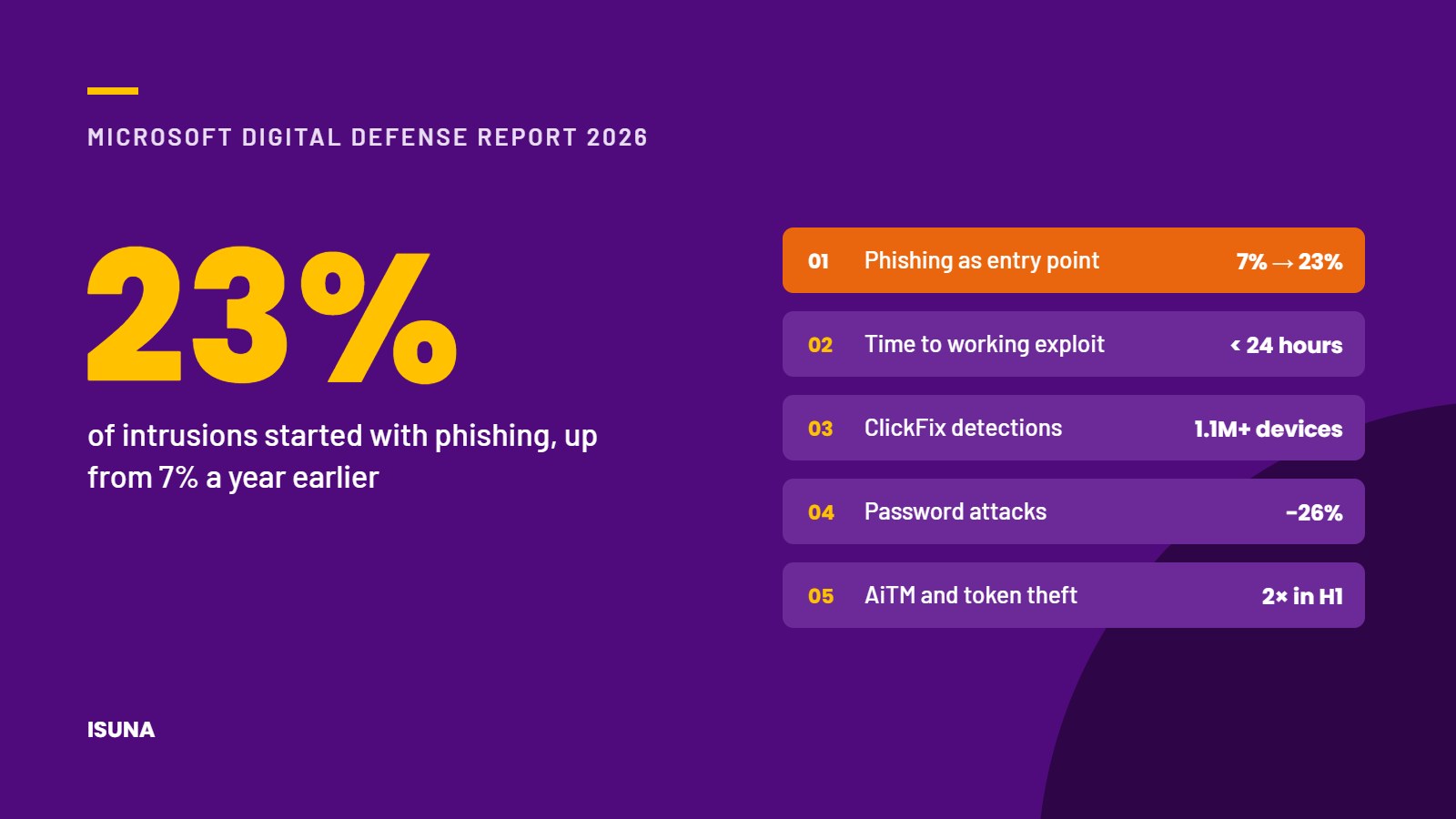
In the incident response cases that Microsoft investigated, phishing was the initial access method in 23% of intrusions during the 2026 reporting period, compared with 7% a year earlier. Phishing emails are increasingly well written and well targeted, partly because attackers use AI to produce them.
For businesses, this means that security awareness training remains important but should not be the only line of defence. Email filtering, protection against malicious links and sign-in methods that cannot be intercepted by a phishing page provide considerably stronger protection.
2. Vulnerabilities are exploited within hours of discovery
Almost 40,000 vulnerabilities, registered as CVEs (Common Vulnerabilities and Exposures), were published in the first half of 2026, and Microsoft expects around 72,000 for the full year, which is roughly twice as many as in 2025. The median time between the discovery of a vulnerability and a working attack is now well under 24 hours, while organisations typically need 30 to 60 days to fix critical vulnerabilities. Microsoft therefore recommends installing updates for systems that are reachable from the internet and for identity systems within 72 hours.
This makes patch management a process that should run continuously rather than once a month. Every organisation should know which of its systems are accessible from the internet, such as VPN connections, firewalls, remote access solutions and email, and should make sure that updates for these systems are installed within days.
3. Attackers bypass passwords by stealing login sessions
Password attacks decreased by 26% compared with the previous year, which Microsoft attributes to the wider use of multi-factor authentication (MFA) and passkeys. At the same time, adversary-in-the-middle (AiTM) phishing and token theft more than doubled in the first half of 2026. In these attacks, a fake login page forwards the user's password and verification code to the real service and captures the session that is created. A traditional 6-digit code or a push notification offers no protection when the user approves such a login.
The most effective response is to introduce phishing-resistant MFA, such as passkeys or security keys, starting with administrator accounts, and to remove weaker fallback options such as SMS codes. Our Knowledge guide on phishing-resistant MFA explains how to approach this step by step.
4. ClickFix attacks are increasing rapidly
ClickFix is a technique in which a fake error message or CAPTCHA instructs the user to copy a command and run it on their own computer in order to solve a supposed problem. Between February and early May 2026, Microsoft Defender detected this technique on more than 1.1 million devices, which is around 8 times more than at the start of that period.
Employees should know that a legitimate website will never ask them to paste a command into the Run window, Terminal or PowerShell. In addition, the ability to run scripts on company laptops can be limited technically to the people who need it for their work.
5. Attackers misuse legitimate remote management tools
According to Microsoft, an unexpected remote monitoring and management (RMM) agent on a device is one of the most reliable indicators of an intrusion by a human attacker. Because IT departments use the same type of software for remote support, malicious use is less likely to be noticed.
Organisations should therefore keep a list of approved remote access tools and treat any other tool that appears on a device as a potential security incident until it has been investigated.
Conclusion
The Microsoft Digital Defense Report 2026 shows that attacks are becoming faster and more targeted, but the most effective countermeasures remain well within reach of growing businesses. Phishing-resistant sign-in, fast installation of security updates and control over the software that runs on company devices already reduce the risk considerably. What these measures require is continuity, and that is often where companies without their own IT department face difficulties. As an external IT department, ISUNA takes care of stronger authentication, update management, device security checks, control of approved tools, security awareness and incident support within the agreed scope. If you would like to know which of these 5 points are already covered in your organisation, we are happy to review them with you. For an overview of how Dutch businesses are doing with basic security measures, you can also read our article on the CBS Cybersecuritymonitor 2025.
Frequently asked questions
What is the Microsoft Digital Defense Report?
The Microsoft Digital Defense Report is Microsoft's annual analysis of the global cyber threat landscape. The 2026 edition was published on 1 October 2026 and covers the period from July 2025 to June 2026.
What is phishing-resistant MFA?
Phishing-resistant multi-factor authentication uses methods such as passkeys and FIDO2 security keys. These methods only work on the genuine website, which means that a fake login page cannot intercept them.
What is a ClickFix attack?
In a ClickFix attack, a fake error message or CAPTCHA asks the user to copy a command and run it on their own computer. This allows attackers to install malicious software without having to exploit a technical vulnerability.