Why standard MFA is no longer sufficient
Multi-factor authentication (MFA) has significantly improved the security of business accounts. According to the Microsoft Digital Defense Report 2026, password attacks fell by 26% in a year, which Microsoft attributes to the wider use of MFA and passkeys. Attackers have responded by changing their approach. In an adversary-in-the-middle (AiTM) attack, a fake login page is placed between the user and the real service. The user enters a password and a verification code, the fake page forwards both to the real service, and the attacker captures the valid session that is created. Microsoft reports that this type of attack, together with token theft, more than doubled in the first half of 2026. The level of protection that MFA offers therefore depends largely on the method that is used, which is why phishing-resistant MFA is becoming the new standard.
Which MFA methods can be intercepted by phishing
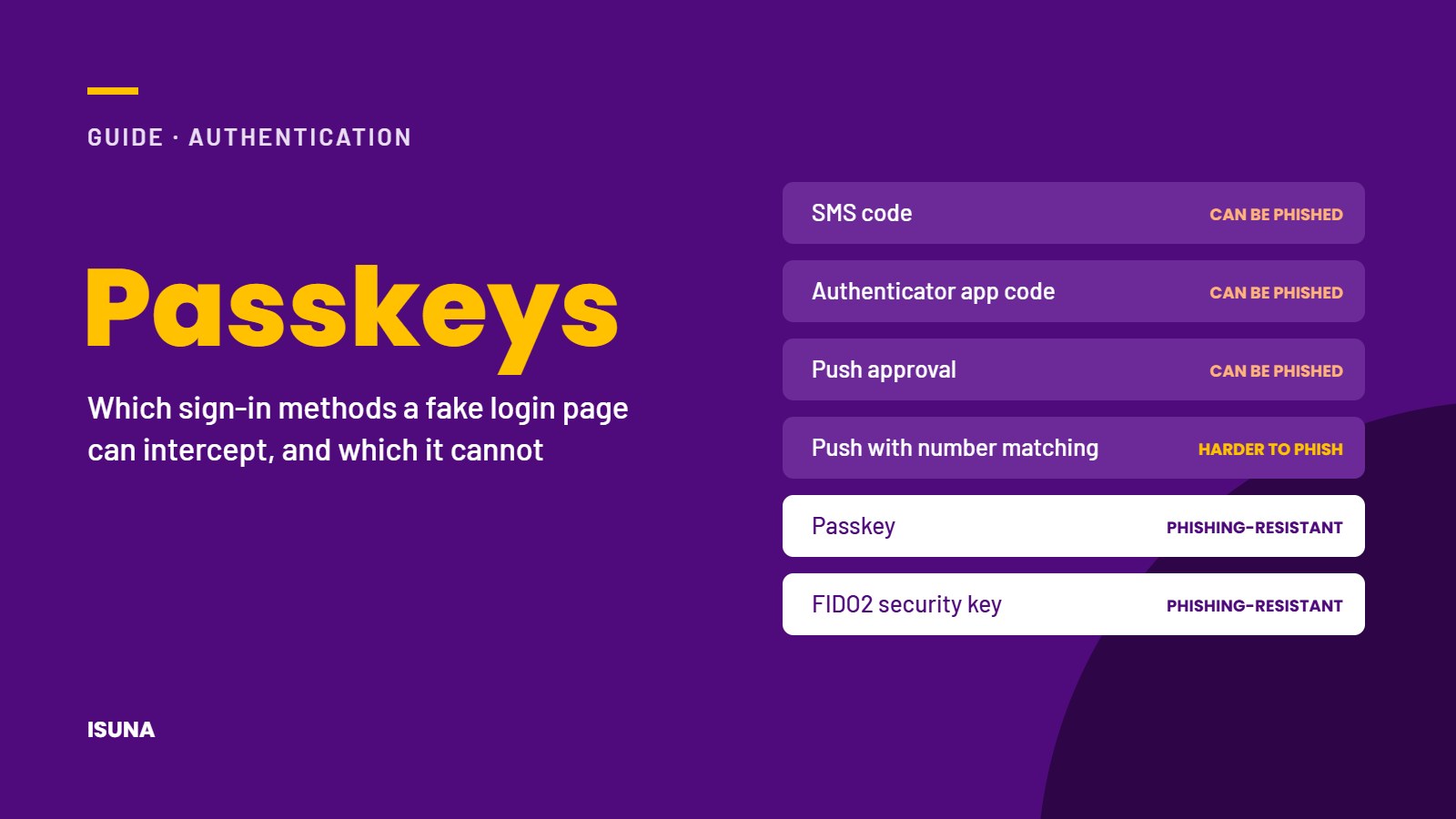
| Method | Can a fake login page intercept or forward it? |
|---|---|
| SMS code | Yes, and SIM swapping is an additional risk |
| Code from an authenticator app | Yes, because the user enters the code on the fake page |
| Push notification asking the user to approve the login | Yes, because users may approve out of habit or after repeated requests |
| Push notification with number matching | It is more difficult, but the login can still be forwarded in real time |
| Passkey on a phone or laptop | No, because a passkey only works on the genuine website |
| FIDO2 hardware security key | No, because it works on the same principle as a passkey |
Passkeys and FIDO2 security keys are phishing-resistant because the cryptographic verification is linked to the address of the genuine website. On a fake domain, the passkey cannot be used, so there is no information that an attacker can intercept.
How to introduce passkeys in 6 steps
Step 1: start with administrator accounts
Accounts with administrator rights are the most valuable to an attacker, and Microsoft recommends device-bound passkeys for administrators. Give each administrator 2 passkeys or security keys, 1 of which serves as a backup, and keep administrator accounts separate from the accounts used for daily work.
Step 2: continue with roles that carry a higher risk
These include finance, management, HR and all employees who approve payments or work with client data.
Step 3: extend the rollout to all employees
Most modern laptops and smartphones already support passkeys through their built-in screen lock, such as facial recognition, a fingerprint or a PIN code. For shared or older devices, a hardware security key is a good alternative.
Step 4: remove weaker fallback options
A strong sign-in method loses much of its value if the login screen still offers the option to receive a code by SMS. Once employees have been enrolled, switch off SMS and voice codes as fallback methods wherever your systems allow it.
Step 5: restrict risky sign-in methods
Limit access to sensitive data from devices that are not managed by the organisation, and block sign-in with a device code wherever it is not needed. Microsoft describes device code phishing as a preferred method for stealing credentials, used by both criminal groups and state-sponsored attackers.
Step 6: prepare a recovery procedure
Decide in advance how an employee who loses a phone or security key can regain access. A reliable procedure includes an identity check by a designated person and a temporary sign-in method with a short validity period. Codes sent to a private telephone number should not be part of this procedure.
Checklist for phishing-resistant MFA
- All administrator accounts use passkeys or security keys and have a backup method
- Employees in finance and management have been enrolled
- All other employees have been enrolled
- SMS and voice codes have been switched off as fallback methods where possible
- Sign-in with a device code has been blocked where it is not needed
- The recovery procedure has been documented and tested
- Employees know what a genuine login page of the organisation looks like
Conclusion
Phishing-resistant MFA is currently one of the most effective measures against account takeover, and for most organisations it can be introduced with hardware they already use. By starting with administrator accounts, removing weaker fallback options and preparing a clear recovery procedure, a company with 10 to 250 employees can make the transition without disrupting daily work. ISUNA sets up and maintains stronger authentication as part of its managed security services. This includes planning the rollout, enrolling administrators first, removing weaker fallback options and handling recovery when a device is lost, all within the agreed scope.
Frequently asked questions
What is a passkey?
A passkey is a sign-in method that replaces the password with a cryptographic key stored on a phone, laptop or security key. The user confirms the login with a fingerprint, facial recognition or a PIN code, and the passkey only works on the genuine website.
Is phishing-resistant MFA expensive to introduce?
In most cases, the costs are limited. Passkeys usually work on devices that employees already use, and hardware security keys are a one-off purchase that is mainly needed for administrators and shared devices.
How do employees experience passkeys?
Once a passkey has been set up, signing in is usually faster than entering a password and a verification code.
What should we do with older applications that only support passwords?
Older applications can be placed behind a sign-in solution that does support strong authentication. Where this is not possible, it is advisable to plan the replacement of the application.